Whether it’s for entertainment, indulging a passion, or discovering something new, more people are turning to YouTube to watch video. In fact, growth in watch time on YouTube is up at least 50 percent year-over-year.1 Now, more than ever, businesses can connect with their customers through video advertising on YouTube.
But we know that creating a video ad can be challenging. To make it easier for every business— from a dog walker to a barber shop owner—to get started with advertising on YouTube, we’re launching the YouTube Director suite of products. Three products that make video ads more accessible to businesses.
Make a video ad right from your phone
With the free YouTube Director for business app (available for iPhone today in the U.S. and Canada) anyone can create a video ad for their business quickly and easily—right from their phone. No editing experience required. People like Woody Lovell Jr., owner of the The Barber Shop Club in Los Angeles, are already seeing positive results with YouTube Director.
Woody shot and edited a video ad by himself, uploaded it to YouTube, and worked with an AdWords expert to run a campaign. As a result, Woody’s business saw a significant increase in potential customers being able to remember and recognize his ad.2
We challenged five business owners—including Woody—to create a video ad in 20 minutes or less. Watch what happened and download the app to give it a try.
Get a professional to make your video ad
In select U.S. cities, we’re also offering YouTube Director onsite, a service that sends a professional filmmaker to shoot and edit a video ad for free whenever a business spends at least $150 to advertise on YouTube. YouTube Director onsite is available in Atlanta, Boston, Chicago, Los Angeles, San Francisco, Washington D.C.—and coming to more cities soon.
Is your business an app? We can create a video ad for you too
YouTube Director automated video creates a video ad automatically from existing assets like logos and app screenshots in the App Store or Google Play Store, and is available globally. Reach out to a Google expert (1-855-500-2756) for more information.
No matter what kind of business you’re in, getting started with advertising on YouTube just became a whole lot easier. We can’t wait to see what you make. Happy filming.
I paused a video in YouTube's app for Android and got this message: "paused videos keep buffering if you leave the app". There's a background buffering feature and YouTube shows the how much data has been buffered. For example, "buffering 11.8/39 MB". YouTube videos are actually cached, so that's the reason why YouTube's cache can become huge.
When YouTube caches the entire video, you'll receive a notification which shows that the video is "ready to watch".
This is useful if you have a slow Internet connection: play a YouTube video, pause it, leave the app and wait until the video is cached. Then you can watch it.
An article from Indian Express mentioned in December that "Google will introduce pause buffer feature soon allowing users to pause video, leave it to buffer, even leave the app or site and let it continue buffering". Google CEO Sundar Pichai delivered a keynote speech at a Google India event in New Delhi and announced a lot of interesting features: "tap to translate" will be released this year, "Google will crowd source the data for its translate feature", "1.4 billion Android users in the world", "free WiFi at 100 railway stations in India by December 2016", "Internet access to Indians in their own language is the focus for Google in India".
YouTube gets closer to virtual reality. Last year, it added support for 360-degree videos and now it supports 360-degree live streaming. "And after years of live streaming Coachella for fans around the world who can't attend the festival, this year we're bringing you the festival like never before by live streaming select artist performances in 360 degrees this weekend," mentions YouTube's blog.
The new interactive live streaming feature will be especially useful for concerts, news and sport events. You can better understand what happens there by customizing your viewing experience and changing your perspective.
YouTube also added support for spacial audio, but only for on-demand YouTube videos (not for live streams). "Just as watching a concert in 360 degrees can give you an unmatched immersive experience, spatial audio allows you to listen along as you do in real life, where depth, distance and intensity all play a role," informs YouTube. There's a playlist of 6 immersive videos with spatial audio. "Enjoy these 360° and VR videos with spatial audio on Android devices. Spatial audio lets you listen to audio from all directions just as in real world. Put on headphones for the best listening experience," suggests the description of the playlist.
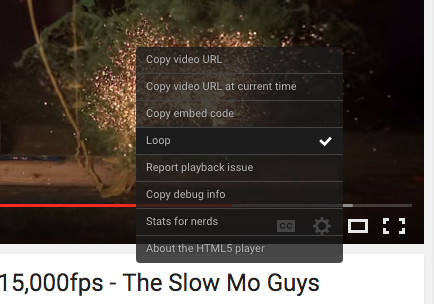
YouTube's HTML5 player looks different. There are new icons, text is bolder, menus are much bigger and the settings menu no longer closes when you pick an option, unless you change video quality.
When you click "copy video URL", "copy video URL at current time" or "copy embed code", the player copies the text to the clipboard and no longer displays it.
Here's a screenshot of the old UI for the contextual menu: