Showing posts with label Google. Show all posts

Google Testing Green ‘Ad’ Logo in Paid Adverts


It is not so often that Google changes AdWords – it is actually rather rare. But, when Google do alter something in PPC advertising, you will usually find that it improves PPC some way or another. The last update to PPC saw the number of paid search adverts increase from three to four while completely removing the right hand side adverts from search results. In the latest innovation in PPC advertising, Google have changed the colour scheme of paid search to feature just three colours: grey, blue and green with the option of orange depending on if certain ad extensions are used.
Before the change, the adverts on Google search results typically looked something like the below image (which was taken from the ‘Analyse A Real PPC Campaign’ series for Loaf):
ad preview tool
As we can see, the advert’s had a certain format in terms of the colours chosen:
  • Any link in the advert would appear as blue.
  • The description of the advert would appear as a grey.
  • The URL of the advert would be in green.
  • The ‘Ad’ logo would appear in yellow.
However, we can see this has changed with the latest alteration Google has made, where they have decided to change the colour of the ‘Ad’ logo from yellow to green:
ad preview tool
Although the change was based on positive feedback from testing and to make clear to the web user that the adverts are adverts, I can see changing the ‘Ad’ logo from yellow to green to have a number of other benefits too:
  1. The advert colour scheme is simpler – Whatever software that is being created, such as Android, Windows 10, Mac OS or iOS, it seems we are heading for simpler software (at least visually). From doing this will make the advert look less cluttered visually which will make the adverts more aesthetically pleasing to look at.
  2. A change always makes a short term difference – Whatever change you make in PPC, you will always see a small spike in results (in the positive direction) from the change. This is because you will have changed how people thought adverts looked to a new format (this time in terms of colours). This, of course, will attract web user’s attention in the short term leading to better results for advertisers of PPC.
  3. Less colours blend paid adverts – Although Google claims that the change will make the ‘labeling clear and prominent’, having adverts with less colours in them will make them closer looking to organic search results. Therefore, it can definitely be seen that the paid search adverts are getting closer looking to organic SEO results, since the colour schemes for both paid search and organic search results are pretty much exactly the same (with the exception of the ad extension colour schemes). For PPC advertisers, this might be great news. For those looking to generate traffic from SEO, this could be slightly worrying as the difference between adverts and organic results (being the ‘Ad’ logo) has now adopted a colour that will enable paid adverts to blend far better with the top of organic search results.

Google Assistant

Sundar Pichai, Google's CEO, mentioned in this year's Founders' Letter that "the next big step will be for the very concept of the 'device' to fade away. Over time, the computer itself — whatever its form factor — will be an intelligent assistant helping you through your day. We will move from mobile first to an AI first world."

Right now, Google has an assistant, but it's not that conversational. You can find it in the Google Now cards and the voice search feature. It's there for answering quick questions, but it's not that good for having meaningful conversations.

This is about to change, now that Google will launch its answer to Amazon's Echo device later this year. It's called Google Home and it's a "voice-activated product that brings the Google assistant to any room in your house. It lets you enjoy entertainment, manage everyday tasks, and get answers from Google — all using conversational speech. With a simple voice command, you can ask Google Home to play a song, set a timer for the oven, check your flight, or turn on your lights".

Google Assistant

Google Home is always listening for the "OK Google" hotword, much like the Google app from your phone. It's also a WiFi speaker with Google Cast support, so you can tell it to play music on other speakers or group it with other speakers. Google Home can even send video to your TV if you use a Chromecast or you have an Android TV.

Google Assistant is not only available in Google Home: it will also be added to the new Allo messaging app and to the Google Search app. "The assistant is conversational — an ongoing two-way dialogue between you and Google that understands your world and helps you get things done. It makes it easy to buy movie tickets while on the go, to find that perfect restaurant for your family to grab a quick bite before the movie starts, and then help you navigate to the theater."

Google Assistant

Google starts to build its own ecosystem of devices that work together: smart routers, smart speakers, smart TVs, smartwatches, home automation devices, car dashboard integration. As people use more smart devices, the Google experience is about to change and Google Assistant will become the main "interface" for interacting with Google.


{ via Google Blog }

Google's Package Tracking Card

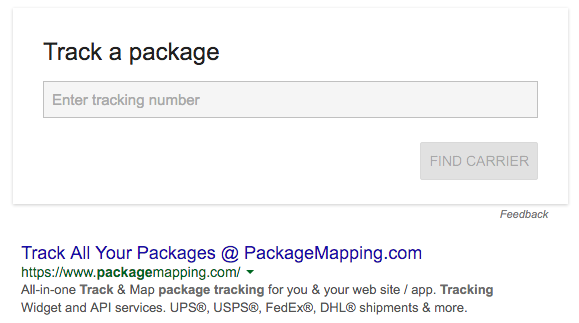
Google Search has a new card for tracking packages. Google has always displayed a package tracking link when searching for a tracking code from UPS, USPS, FedEx and other carriers, but now you can search for [track package] and enter the tracking number. Click "Find carrier" and Google shows a link like "Track via UPS" or "Track via FedEx". If Google can't find a carrier, it will show this message: "Can't match this number to a carrier".

Tracking Card

Tracking Card

The same card is also displayed when you search for the tracking number.

Another option to track your parcels is to search for [my packages], [my purchases] or [my orders] and Google will show a summary of your orders, including the tracking links, but only if they're available in the confirmation emails. When you search for [track my packages], [track my purchases] or [track my orders], Google also expands the most recent order.

Save Links to Google Inbox

Google Inbox has a new bundle called "saved". When you click it, you get this description: "Don't forget the articles, videos and other links you want to get back to. Use the Inbox Chrome extension or mobile share button to add links here."

The Inbox Chrome extension has been launched today and it's only useful for saving links and sharing pages via email.

Google Inbox

Google Inbox

Now you no longer have to send yourself messages with links to pages you want to read later. The links are added to the inbox and they're also saved as reminders. It's strange that you can't add links from the Google Inbox interface and you have to use a Chrome extension or the share feature from Android.

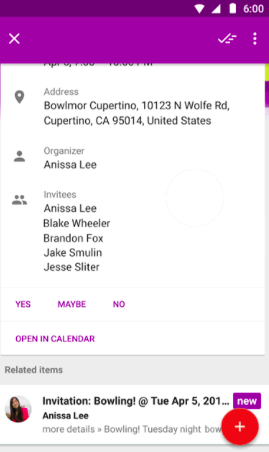
Another interesting feature groups the messages related to a Google Calendar event. "Inbox now gathers emails from a single event together and shows you what's changed at a glance. When you tap on an event, you'll see a comprehensive overview, all in one place," informs Gmail's blog.

Google Inbox

Inbox has a new interface for newsletters, which highlights the articles, so you can open them faster. Apparently, the new interface is only displayed for newsletters you read often and it also includes a preview that's hidden after you've opened the newsletter.

Google Inbox

Chrome Extension for Google Keep

There must be an internal contest at Google for creating Chrome extensions that save links. After "Save to Google" and "Save to Inbox", there's now a Chrome extension for Google Keep that lets you create notes about the page you're currently visiting. "The next time you're on a website that you want to remember or reference later on, use the new Keep Chrome extension to add it — or any part of it — to a note in Keep. Just click the Keep badge to add a site's link to a note, or select some text or an image and create a new note from the right-click menu," suggests Google.

Chrome Extension

If you have an Android device, you can now create notes directly from your favorite browser: just use the sharing feature and pick Google Keep. You'll be able to write your note right inside Chrome and other browsers, without having to open Google Keep.

Another useful feature in Google Keep: you can now add labels to your notes as #hashtags. For example, you can write: "#work #todo #readlater" and Google Keep will add 3 labels to your note. The nice thing is that Google Keep uses autocomplete, so you can quickly select an existing label. If the label doesn't exist, you need to click the "create" option and the hashtag will become a link.

Chrome Extension

Google Play Music Still Requires Flash

I uninstalled Flash Player on my computer, now that most sites no longer need it. Adobe's Flash Player is still bundled with Chrome, so I had to disable it from thechrome://plugins/ page.

One of the only Google services that still requires Flash is Google Play Music, but only if you don't use Chrome or Internet Explorer 11. I tried opening Google Play Music in Firefox and Safari and got this message: "Missing Flash Player. You need the latest Adobe Flash Player to listen to music."

Google Play Music

There's actually a Lab experiment called "HTML5 audio" in the settings and it's grayed out and disabled. It claims that it allows you to "listen to your music without the need for Flash. Support for this lab is still experimental, and it may not work in all cases," informs the description.

Google Play Music

Well, it looks like the Lab experiment only works in Chrome, not in other browsers. It's hard to tell why HTML5 audio is still an experiment and not a regular feature that works in all browsers. YouTube's HTML5 player works well in most browsers and Google Play Music uses the same back-end.

Import Chrome Bookmarks Into Google Save

If you install the "Save to Google" extension for Chrome, you can now import your Chrome bookmarks into the Google Save site. Just open the sidebar menu from the Google Save site, click "import Chrome bookmarks" and wait a few minutes until all your bookmarks are saved online. Reload the pages and you'll see all of your Chrome bookmarks next to the pages and images you've previously saved.

Import Chrome Bookmarks

Folders and subfolders are converted into tags. Let's assume that the folder "Google" has a subfolder called "Blogs". The two folders are converted into two tags: "Google" and "Google > Blogs", while the bookmarks from the "Blogs" subfolders get both tags.

Import Chrome Bookmarks

For now, there's no way to sync Google Save with Chrome bookmarks and theBookmark Manager extension doesn't integrate with Google Save, even if they're closely related.

Metronome Card in Google Search

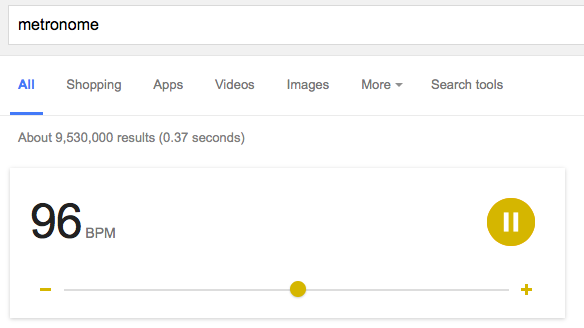
Google shows a special card when you search for [metronome]. The default beat rate is 120 BPM, but you can change the value from 40 to 208 BPM by pressing the "+" and "-" buttons. Google plays a sound, shows an animation and changes the color of the UI, depending on the selected value.

Metronome Card

Metronome Card

According to Wikipedia, "a metronome is any device that produces regular, metrical ticks (beats, clicks) — settable in beats per minute. (...) The metronome is used by musicians to help keep a steady tempo as they play, or to work on issues of irregular timing, or to help internalize a clear sense of timing and tempo."

Smart Reply in Desktop Google Inbox

If you're getting a lot of emails and you're tired of writing replies, Google's Inbox service has a feature that suggests 3 short replies. It was first added to the Inbox mobile apps and now it's available in the desktop site. Apparently, 10% of all the replies on mobile already use Smart Reply.

Google Inbox

Smart Reply uses machine learning to figure out if a short reply is appropriate and then predicts likely responses. "The Smart Reply System is built on a pair of recurrent neural networks, one used to encode the incoming email and one to predict possible responses. The encoding network consumes the words of the incoming email one at a time, and produces a vector (a list of numbers). The second network starts from this thought vector and synthesizes a grammatically correct reply one word at a time, like it's typing it out. Amazingly, the detailed operation of each network is entirely learned, just by training the model to predict likely responses."

{ Thanks, VDataRoom. }

Google's Blogs Move to a Custom Domain

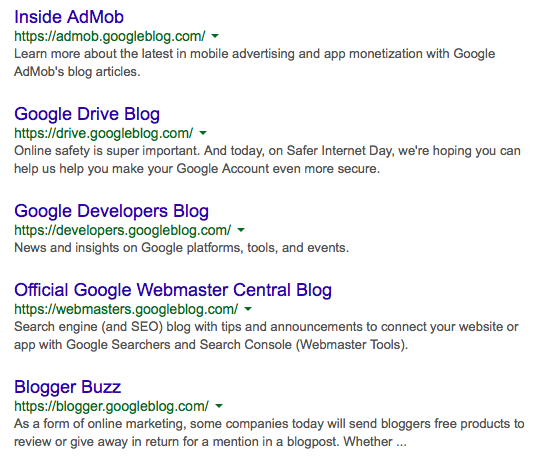
Last week, John Mueller announced that Google is moving all of its blogs to a custom domain: googleblog.com. For example, Gmail's blog has a new URL:gmail.googleblog.com, which replaces gmailblog.blogspot.com.

"Google is moving its blogs to a new domain to help people recognize when they're reading an official blog from Google. These changes will roll out to all of Google's blogs over time. The previous address will redirect to the new domain, so your bookmarks and links will continue to work."

Custom Domain
A long time ago, many people thought that this is an official Google blog and I had to keep explaining that the blog is not affiliated with Google. I added more and more disclaimers, but that's still not enough for everyone. Now that Google's blogs move from blogspot.com to googleblog.com, it's much easier to tell things apart.